
Help Center
To view the help center, perform the following steps:
1. Login to the EZ Extension application.
2. On the dashboard page, click the  User Profile in the top right corner of the page, and then select
  Help Center.
User Profile in the top right corner of the page, and then select Help Center.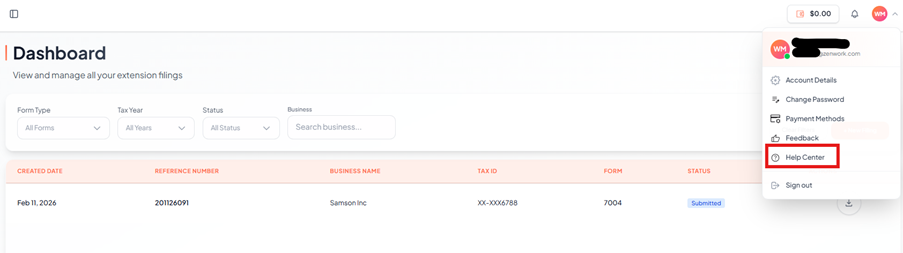
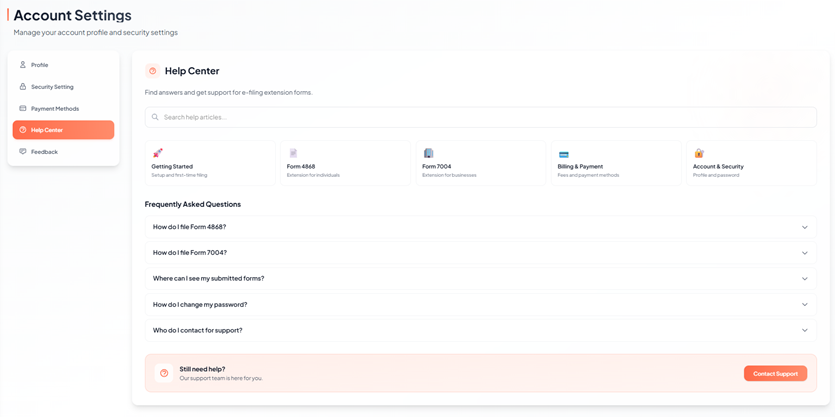
The Account Settings page appears under Help Center section, answers to common questions and support resources related to efiling extensions, billing, and account management.
3. From the Help Center, you can:
· Search help articles using the search bar.
· Browse categories such as Getting Started, Forms 4868, Forms 7004, Billing & Payment, and Account & Security.
· View Frequently Asked Questions (FAQs).
· Contact support if additional assistance is required.