
Forms
The Forms page allows you to create and manage IRS extension forms. From this screen, you can select the required IRS form type and begin a new filing process.
Create New Form
To create a new extension form, perform the following steps:
1. Log in to the EZ Extension application.
2. From the left pane, click Forms.
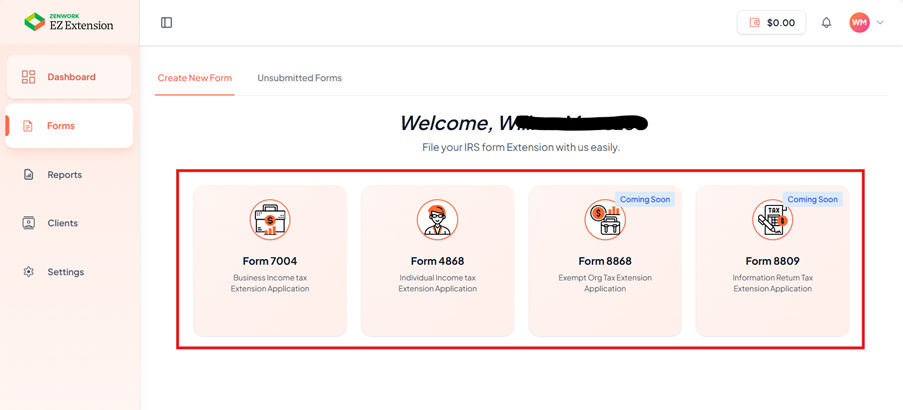
3. Click the Create New Form tab.
The available extension form types appear.
4. Select the form type you want to file by clicking one of the following options:
-
Form 7004 – Business Income Tax Extension Application
-
Form 4868 – Individual Income Tax Extension Application5. Click the required form tile to begin the filing process.
Forms (Coming Soon)
The following forms are currently marked as Coming Soon and are not available for filing currently:
-
Form 8868 – Exempt Organization Tax Extension Application
-
Form 8809 – Information Return Tax Extension Application
Unsubmitted Forms
The Unsubmitted Forms page allows you to view, edit, delete, and submit extension forms that are currently in draft status. Use this page to complete the review process and finalize your filings.
To access draft forms, perform the following steps:
1. Log in to the EZ Extension application.
2. From the left pane, click Forms.
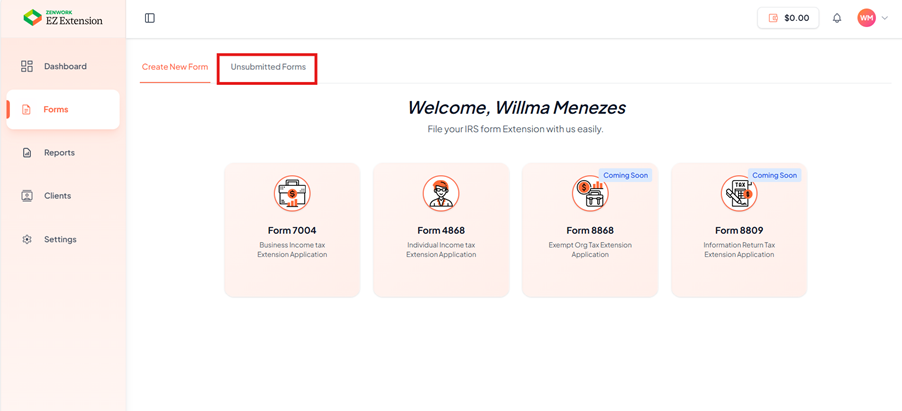
3. The Forms page appears. Click the Unsubmitted Forms tab.
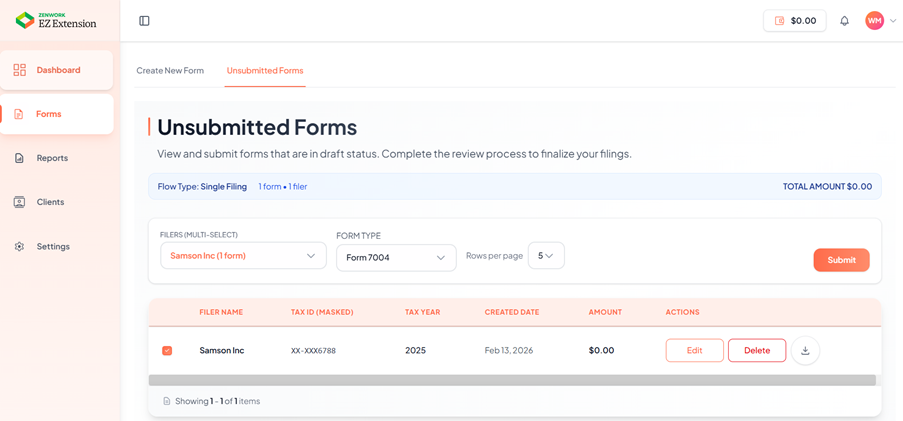
The unsubmitted forms page appears.
4. Select the filer type from the Filer list.
5. Select the form type from the Form list.
6. The unsubmitted forms are displayed on the screen.