
Feedback
The Feedback section allows users to share their experience, suggestions, or report issues to improve the EZ Extension platform.
To view the feedback, perform the following steps:
1. Login to the EZ Extension application.
2. On the dashboard page, click the  User Profile in the top right corner of the page, and then select
  Feedback.
User Profile in the top right corner of the page, and then select Feedback.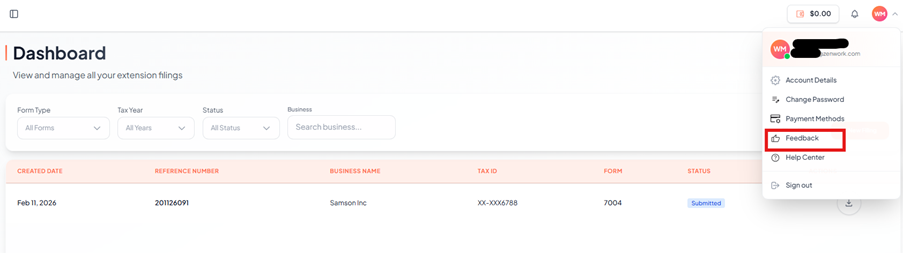
The Account Settings page appears under Feedback section allows users to share their experience, suggestions, or report issues to improve the EZ Extension platform.
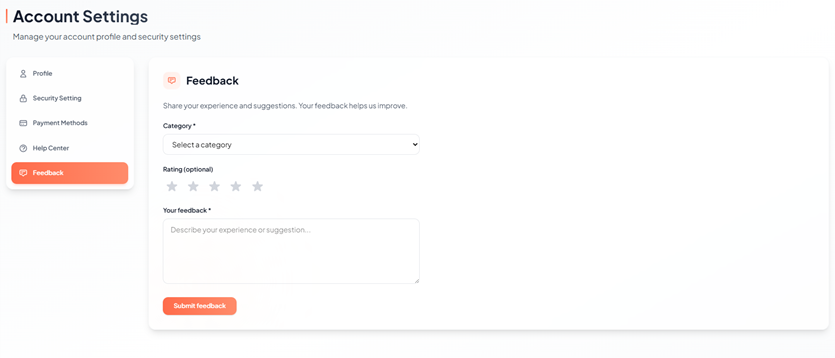
3. To Submit Feedback, follow the steps below to submit feedback:
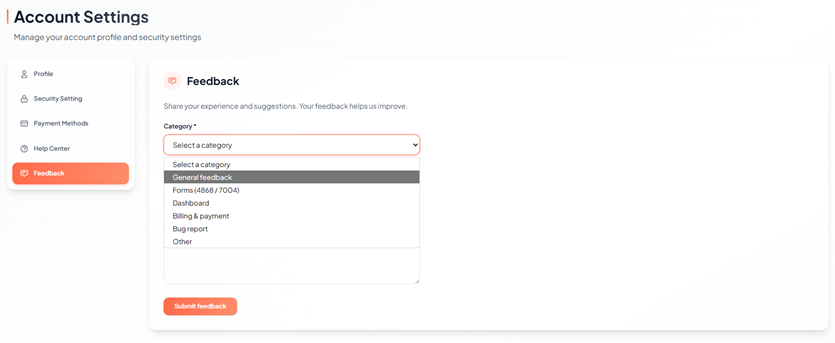
4. Select a Category (Required)
o Click Category drop down.
o Choose the appropriate option:
§ General feedback
§ Forms (4868 / 7004)
§ Dashboard
§ Billing & payment
§ Bug report
§ Other
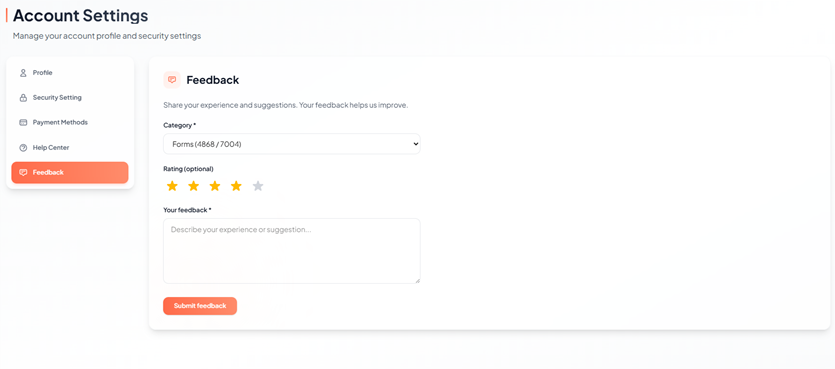
5. Provide a Rating (Optional)
o Click the star icons to rate your experience (1–5 stars).
o This step is optional but helps us understand your experience better.
6. Enter Your Feedback (Required)
o In the text box, describe your experience, suggestion, or issue in detail.
7. Click Submit Feedback.